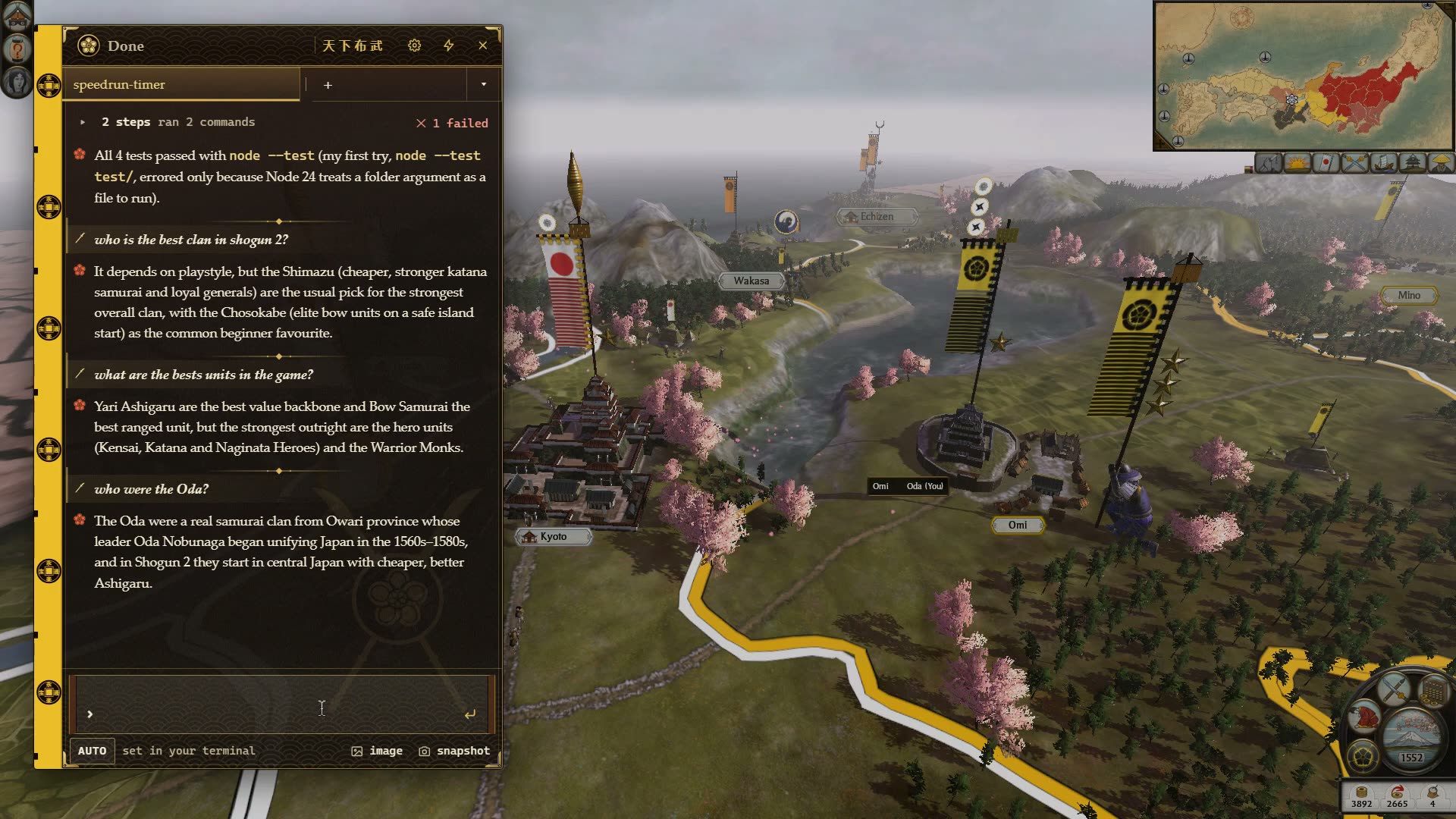
Use Claude Code during the AI's turn in SHOGUN 2
A panel over the campaign map shows your Claude Code session. Read what it did, answer it, then end turn.
Install Claudictive on this PC? Free, Windows 10+.Send the installer to your Windows PC?
approved by Overwolf · free · windows 10+
A panel on the campaign map, not another window
Press Ctrl+Alt+G on the campaign map and a panel slides in on the left of the screen. The map and the banners stay right there behind it. Press it again and the panel is gone.
Inside the panel is the Claude Code session you already have running in a terminal or editor on the same PC. Claude Code is Anthropic's AI assistant for programmers: it writes and edits code for you, and now and then it stops to ask a question or to ask before it runs something. The panel shows those moments, so you can answer from the game instead of switching out of it.
Each terminal gets its own tab. The + tab is a quick chat for anything else, including questions about the game itself.
SHOGUN 2 already gives you the pauses
A campaign turn has long stretches where the game does not need your hands. Those are the moments to glance at Claude Code.
The AI's turn
Every other clan moves its armies, agents and fleets. On a late campaign that can take a while. Open the panel, see what Claude Code finished, answer its question, and close it before your turn comes back.
Battle loading screens
Loading into a siege or a field battle is a short wait you cannot skip. Long enough to allow a file edit Claude Code asked about.
Recruiting and replenishing
Armies sitting in a province to replenish, buildings that take a few turns: the slow turns of a campaign are where a coding session moves along without you leaving the map.
Waiting on a deal
Thinking over a trade agreement or an alliance offer? Claude Code's question can usually be answered faster than you decide whether to trust the Takeda.
How it works in a SHOGUN 2 campaign
- Start Claude Code first. Give it a task in your terminal or editor, the way you normally would, then launch SHOGUN 2.
- Play your turn. Nothing shows over the game until you ask for it or Claude Code needs you.
- End turn, press Ctrl+Alt+G. The panel shows the session: what Claude did, and any question it is waiting on.
- Answer or approve. Type a reply, or allow a request with Ctrl+Alt+A (deny with Ctrl+Alt+X). It is the same session, so the terminal sees the answer too.
- Close the panel. Ctrl+Alt+G again, and your turn is back on screen.
more on the overlay itself: Claude Code inside your game · approving permissions in-game
Get Claudictive for SHOGUN 2
Free. One installer from Overwolf sets up the Overwolf client if you don't have it yet, then Claudictive.
~3 MB installer from download.overwolf.com · windows 10 or later · needs claude code on the same pc.
stuck? contact us or ask on discord.
- Run the installer. It installs Overwolf if you don't have it, then Claudictive.
- Click Connect in the hub. It lists exactly what it writes to
~/.claude/before writing anything. Not now also works: overlay chat still runs. - Say hi from Claude Code. In any terminal, ask Claude Code to do something with a tool, like listing your files. The hub says Connected.
- Launch SHOGUN 2. Questions, approvals and finished work show up over the campaign map.
SHOGUN 2 questions
Does it work on the campaign map and in battles?
Do I need to switch SHOGUN 2 to windowed mode?
Can I ask Claude about the game itself?
Will the panel get in the way when my turn starts?
more questions? see the main faq, contact us or ask on discord.