How a desktop-only app's website can handle phone visitors, with no backend
Written by Odi with Claude, from the Claudictive git history. Every claim is checked against its source before it is published. How we write
A phone visitor on a desktop-only app's website is not a lost download if you give them a way to bring the link to their PC. On claudictive.com, a phone sees up to four buttons instead of the Windows download: email it to yourself, share it, a calendar reminder, and copy link. None needs a backend or collects anything new.
I build Claudictive, an in-game overlay for Claude Code, with Claude Code itself. It runs in games like World of Warcraft, League of Legends or Valorant, and it installs only on a Windows PC, through Overwolf. This is the short story of what we show people who find it on their phone, and why we skipped the obvious email form.
What happens when someone opens a Windows app's website on their phone?
They hit a dead end. The big button says download for Windows, a phone can't do anything useful with a Windows installer, and nothing on the page works on a phone.
I noticed it while looking at the site's own analytics and conversion. The write-ups I found solve the reverse problem: a desktop visitor and a mobile app. Branch recommends a "text me the app" page, and Mozilla's Send to Device widget is a form that emails a download link from a desktop browser to a phone. Both send the message from the site's side, through a server.
For our direction, phone visitor and desktop app, very little is written. The nearest thing is old redirect advice: in 2014 mobiForge quoted Google as saying "if there is no corresponding mobile page for a desktop page, then there should be no redirection at all". So the phone visitor stays on the real page, and the page has to offer them something.
Should you collect their email and send the link yourself?
That was option 2 in our decision record (ADR-031): collect an email address and mail the download link from our side. It looks like one form. Built safely, it is a lot more:
- a transactional email provider and a verified sending domain;
- abuse controls on a form that sends mail to any address someone types in, which means rate limits and a bot check;
- a new section in the privacy page, because we would now hold email addresses;
- a retention rule for how long we keep them.
Option 1 was to let the visitor send the link to themselves with the phone's own tools. I picked option 1. I wanted the method that would "reduce the privacy risks as far as possible", and I wanted something quick, relatively. An email form adds a new kind of data and a new thing to defend. The phone already has a mail app, a share sheet, a calendar and a clipboard.
How do you send a download link to your PC with no backend?
On a touch phone, each download button on the homepage, the use-case pages and the blog posts is replaced by a small panel. It reads: "On your phone? Claudictive installs on a Windows PC. Send yourself the link and grab it when you're back at your desk." The homepage hero swaps its download button for one that jumps to the panel in the download section.
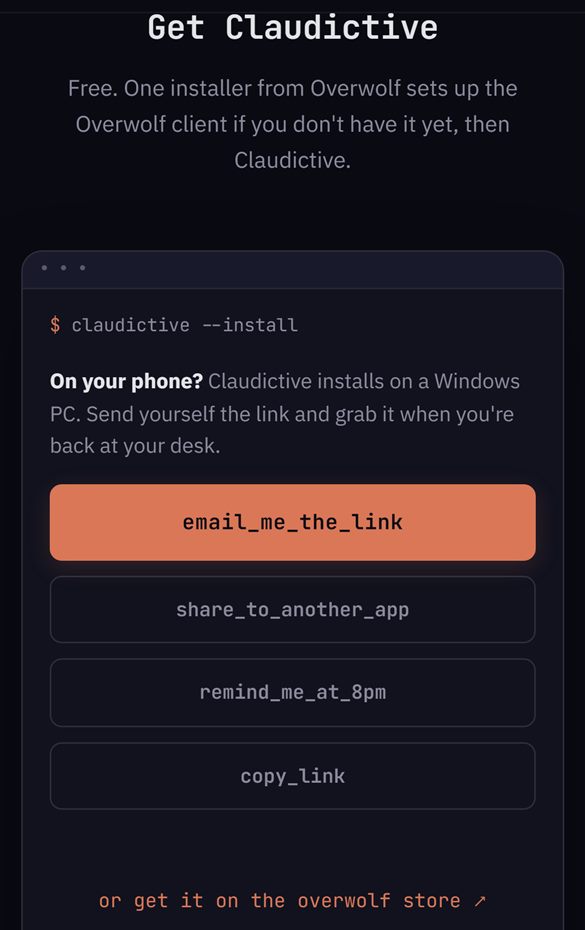
The live download section at phone size (Chrome's phone emulation).
The panel picks phones with a media query, so a desktop with a mouse never sees it:
window.matchMedia('(hover: none) and (pointer: coarse)').matches
The buttons:
email_me_the_link: amailto:link with no recipient. The visitor's own mail app opens with the subject and the link filled in, they type their own address and send it themselves. The address never touches our site.share_to_another_app: the phone's share sheet (navigator.share), for sending the link to a notes app, a chat with yourself, or anything else.remind_me_at_8pm: downloads a one-event calendar file (.ics) with the link in it and an alarm at the start time.copy_link: copies the link to the clipboard.
Only the email button always shows. Share, the calendar reminder and copy appear only where the browser supports them. That matters, because a mailto: link needs a mail app set up on the phone, and on a phone without one, whichever of the other three the browser supports are still there.
The core of the email and the reminder is a few lines of plain JavaScript:
// mailto with no recipient: the visitor picks their own address.
'mailto:?subject=' + encodeURIComponent(TITLE) + '&body=' + encodeURIComponent(body)

// 20:00 local today, or tomorrow when it is already 19:00 or later.
var day = now.getHours() >= 19 ? now.getDate() + 1 : now.getDate();
return new Date(now.getFullYear(), now.getMonth(), day, 20, 0, 0);
The reminder uses floating local time, so it goes off at 8pm wherever the visitor is. I picked 8pm by thinking about my own routine and when I'm usually in front of the computer. From 7pm on, it is set for the next evening instead.
If the script fails for any reason, the page keeps its normal download button. Claude Code built the panel and the unit tests, which run it in a fake DOM and check the mailto and calendar-file builders. The parts only a real phone can prove, the mail app taking the mailto: and the calendar opening the reminder, I checked by hand on my own phone on the live site.
What do you count, and what stays on the phone?
We count the tap, and we don't count it as a download. The buttons send us nothing else. The privacy page says it this way: "On a phone this also covers the send-it-to-yourself buttons (email, share, calendar reminder, copy link): we only count the click. Your email address, your contacts and what you share stay in your own apps and never reach us."
That sentence was added to the privacy page in the same change as the panel. No new kind of data, no new storage, no new section.
When would we build the email form after all?
It is still an option. If the panel shows that people really want the link mailed to them, option 2 is written down with everything it needs. Until then, the phone's own tools do the job, and there is nothing new to protect.